

AI Software for Small Business Hiring: Save Time and Hire Smarter
Learn how AI software for small business hiring speeds screening and scheduling, improves candidate matching, and reduces admin work for small teams.
Small business hiring can feel overwhelming. Sorting resumes, chasing interview times, and following up with candidates eats up hours you don’t have. AI software for small business hiring helps reduce that workload by handling the repetitive tasks that slow everything down.
HRMLESS supports small teams by automating screening, scheduling, and early candidate communication. That means fewer bottlenecks, faster decisions, and more time spent actually talking to the right people instead of managing inbox chaos.
This guide breaks down what AI hiring software really does, which features matter most for small businesses, and how to choose a tool that fits your budget and hiring pace without overcomplicating your process.
What Is AI Software for Small Business Hiring?
AI software for small business hiring uses artificial intelligence to help you find and select job candidates more quickly and (hopefully) with less hassle. These tools take care of repetitive tasks automatically and help you make smarter decisions about who to bring on board.
Definition and Core Concepts
AI recruiting software is basically a smart helper that leans on artificial intelligence, machine learning, and natural language processing to make your hiring life easier.
It can read resumes, match candidates to jobs, and even chat with applicants without you having to do every little thing yourself.
The software learns from your data and gets better the more you use it. It starts to pick up on what makes a great hire for your business.
- Machine learning helps the system recognize patterns in who’s worked out before. It uses that info to spot similar people in the future.
- Natural language processing lets the AI read and “get” written stuff like resumes and job ads. So, it can zip through hundreds of applications and pull out what matters most.
You end up saving hours you’d otherwise spend slogging through resumes.
Types of AI Tools Used in Hiring
AI tools tend to focus on specific parts of the hiring process.
- Resume screening tools read through applications and rank people based on qualifications. They hunt for keywords, skills, and experience that match what you want.
- Candidate matching systems compare job seekers to your open roles. They look at skills, experience, and sometimes even crawl job boards or social media to find folks who haven’t applied yet.
- Chatbots and automated communication tools answer candidate questions and handle interview scheduling. They send updates about application status and keep people in the loop, even outside office hours.
- Assessment platforms use AI to test candidates, sometimes through video interviews, skills challenges, or personality quizzes. The software can even try to gauge cultural fit.
Benefits for Small Businesses
AI can save you a mountain of time by handling repetitive stuff like resume screening. Instead of reading 80 applications, you can focus on actually talking to the handful of top candidates the AI picks out.
You spend less money on hiring, too. With fewer manual tasks, you can fill open roles faster and avoid the cost of leaving positions empty.
AI boosts the quality of your hires. It can process way more candidates than you’d ever have time for, so you’re less likely to miss that hidden gem in a stack of resumes.
You also get access to tools that used to be reserved for big companies. Many AI recruiting platforms have affordable plans built for smaller teams, so you can actually compete for top talent.
Key Features of AI Hiring Solutions
AI hiring software comes packed with features designed to make recruiting smoother and faster. These tools take care of chores like sorting resumes, scheduling interviews, finding the right candidates, and helping you run a fair hiring process.
Resume Screening and Filtering
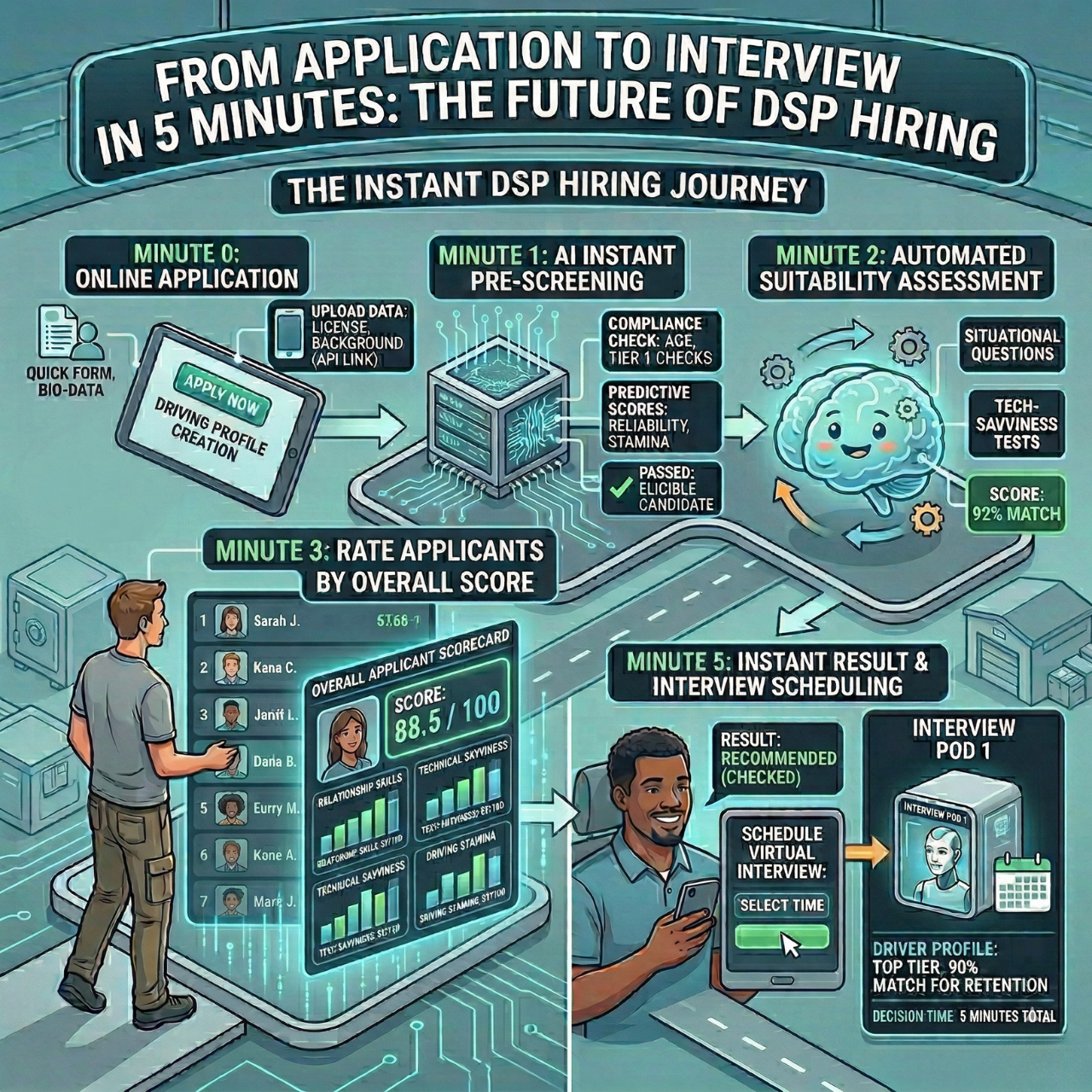
AI-powered resume screening means you’re not stuck reading every application yourself. The software scans for skills, experience, education, and keywords that line up with your job.
You set filters for what’s important, and the AI ranks applicants by how well they fit. That way, you only spend time on people who actually meet your needs.
Most tools use natural language processing, so they don’t just match keywords. They understand context. For example, “managed a team” and “led a group” both count, even if worded differently.
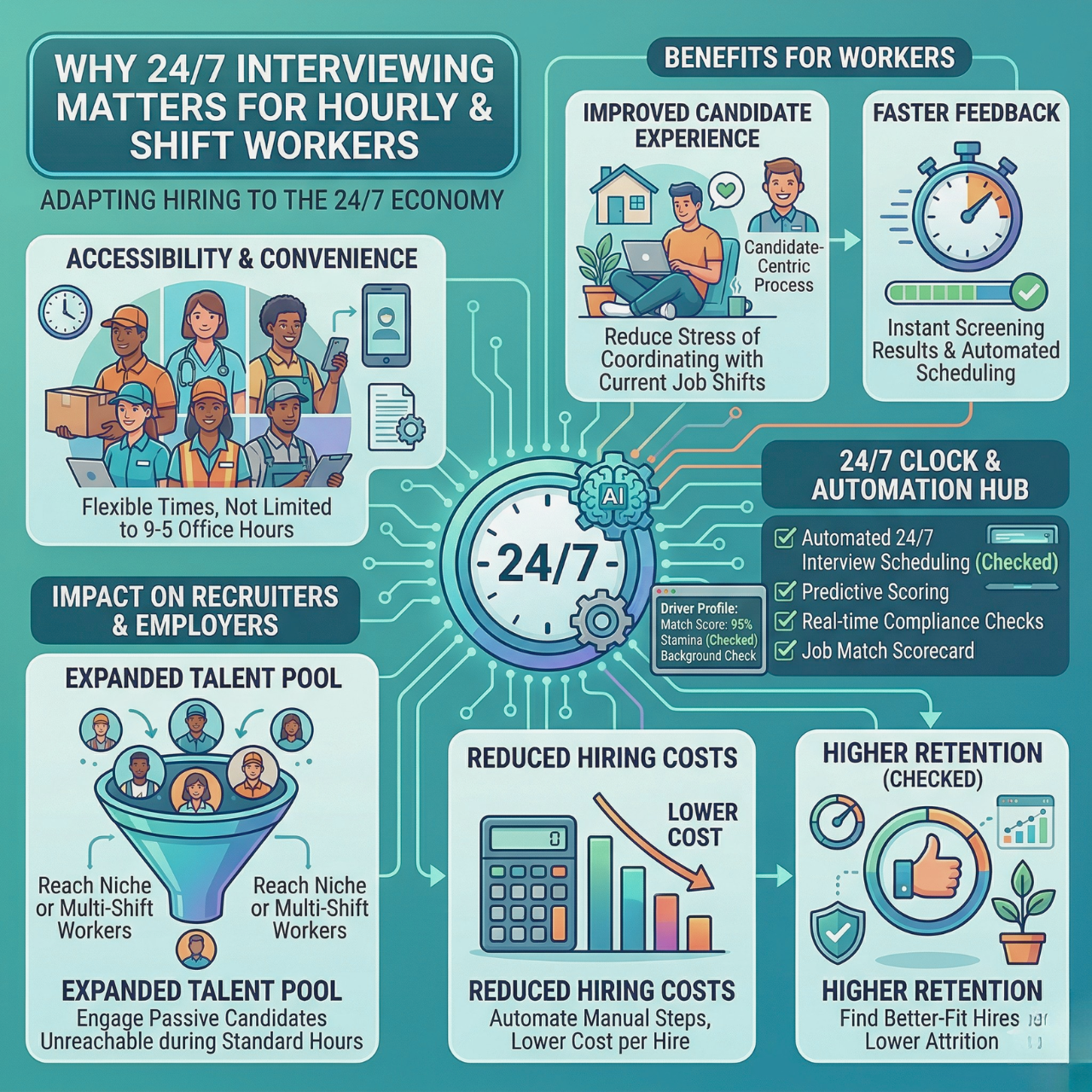
Screening happens around the clock, so applications get processed as soon as they come in. No more waiting for someone to check the inbox.
Automated Interview Scheduling
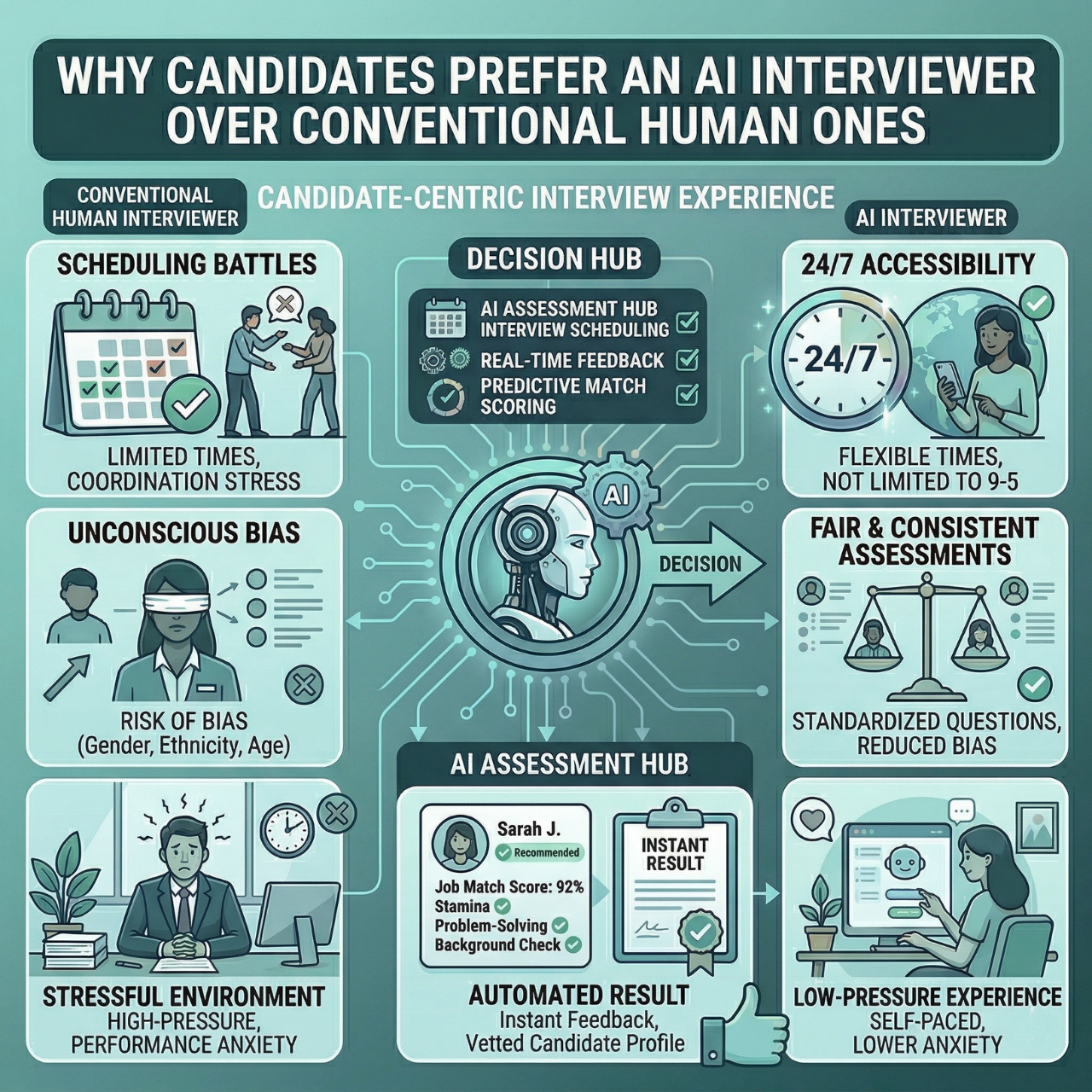
Interview scheduling tools take the headache out of endless back-and-forth emails. The AI connects to your calendar and shows candidates when you’re free.
Applicants pick a slot that works for them, and the system sends out invites and reminders. If someone needs to reschedule, they do it right through the tool, no phone tag required.
You can set different interview types and lengths. Maybe phone screens are 15 minutes, in-person chats are an hour. The software makes sure you’ve got enough breathing room between meetings, too.
AI-Powered Candidate Matching
Candidate matching uses AI to find people who fit both the job and your culture. The software looks at who’s succeeded in your company before and learns from it.
When new applications arrive, the AI compares them to those patterns and gives each person a score. Some platforms even pull info from social media to give you a more complete picture.
This helps you spot strong candidates you might have missed. The AI sees potential and transferable skills that aren’t always obvious on paper.
Diversity and Bias Reduction Tools
AI tools can help you build a fairer hiring process. The software hides names, photos, ages, and addresses when screening starts.
Many platforms flag biased language in your job ads and suggest more neutral alternatives. Some even track diversity stats throughout your hiring pipeline so you can see where certain groups drop off.
The AI focuses on skills and qualifications, not who someone is or where they’re from. That gives everyone a fair shot.
How to Choose the Best AI Recruitment Software
Picking the right AI recruitment software really depends on your hiring volume, budget, and how tech-savvy your team is. You want something that fits your current workflow, not a bloated package you’ll never use.
Assessing Business Needs
Start by figuring out how many roles you fill each month. If you’re only hiring a couple people a quarter, your needs are pretty different from a business bringing on 10+ folks every month.
Where does your hiring process slow down?
- Do you lose hours reading resumes?
- Or do candidates disappear during scheduling?
Choose software that fixes your actual pain points.
A few things to think about:
- What types of jobs you hire for (hourly, skilled, remote)
- Monthly budget for hiring tools
- How many people handle recruiting
- How much time you spend on each hiring stage
If you only hire occasionally, free or budget-friendly tools can do the job. If hiring is constant, you’ll want something more robust. Match the tool’s capacity to your real hiring frequency, not some dream scenario.
Evaluating Ease of Use
You shouldn’t need a computer science degree to use recruitment software. Try out the interface before you commit. Can you post a job in under five minutes? Is it easy to find candidate info?
Good software has simple dashboards. You should see at a glance how many applications you’ve got, who’s reviewed them, and where each candidate is in the process.
Red flags:
- Too many clicks for basic tasks
- Jargon instead of plain English
- Needing IT to set things up
Ask for a trial or demo. Let the people who’ll actually use it test it out. They’ll spot issues fast.
Integration With Existing Systems
Check if the AI tool plays nicely with what you already use. Most small businesses need it to connect with email, calendars, and job boards.
Your recruitment software should:
- Sync with your email so you’re not bouncing between programs
- Integrate with calendars so candidates can book interviews automatically
- Connect to job boards so you post once and the software shares your listing everywhere
Must-have integrations:
- Email (Gmail, Outlook)
- Calendars
- Industry job boards
- Your HR or payroll software
Some tools offer open APIs for custom connections, but most small businesses do better with plug-and-play integrations. Ask vendors which integrations are included and which ones cost extra.
Implementation Tips for Small Businesses
Rolling out AI hiring tools takes a bit of planning. Focus on prepping your team, knowing what AI can (and can’t) do, and making sure you protect applicant data.
Staff Training and Onboarding
Your team needs a proper intro before diving in. Start with a hands-on demo so everyone can poke around and get comfortable.
Put together quick reference guides for common tasks like reviewing AI summaries or reading screening scores. Use screenshots and keep instructions simple.
Check in regularly during the first month to answer questions and squash any confusion. People might worry AI will take their jobs, so explain that it’s here to handle the boring stuff, not replace real conversations with candidates.
Pick one person as your AI tool champion. They’ll become your in-house expert and point of contact with the vendor. Most platforms come with free video tutorials or webinars. Use those instead of shelling out for pricey consultants.
Setting Realistic Expectations
AI hiring tools are great for specific jobs like scanning resumes, scheduling interviews, and answering basic questions. But they’re not magic.
They can’t judge cultural fit or make final hiring calls. You’ll always need real people to run interviews and size up soft skills.
Expect a learning curve, maybe two or three months, while the AI gets better with more data. It might make a few mistakes at first, so keep an eye on its decisions. Budget for ongoing costs, not just the subscription. You might need to pay for extra features, more users, or integrations.
Ensuring Data Privacy
AI hiring software collects sensitive stuff like names, addresses, work history, and sometimes even Social Security numbers. You need to protect this info to stay legal and keep candidate trust.
Pick vendors who encrypt data both in storage and during transfer. Ask about security certifications like SOC 2 or ISO 27001.
Look over your vendor’s data retention policy. Know how long they keep candidate info and if they use it to train their AI.
Write a clear privacy policy for candidates:
- What data you collect
- How the AI uses it
- Who gets access
- How long you keep records
- How candidates can ask for deletion
Limit employee access based on job roles. Not everyone needs to see everything. Set permissions so recruiters only view what’s relevant to their openings.
Run regular audits of your AI tool’s activity logs. Look for any weird access or data transfers. Most platforms let you check these logs right in the admin panel.
Future Trends in AI for Small Business Hiring
AI hiring tools keep getting smarter, leaning into advanced automation and better candidate experiences.
Small businesses can expect systems that juggle more tasks while still creating a personal touch with job seekers. It’s a weird balance: more automation, but also more connection.
Emerging Technologies
AI agents are shaking up how small businesses handle hiring workflows. These tools do more than just screen resumes. They run initial video interviews, answer candidate questions on the spot, and schedule follow-ups without you lifting a finger.
Voice-based AI assistants are popping up more often in hiring. You can use them to pre-screen folks over the phone or through voice messages.
Machine learning systems now predict which candidates are likely to stick around. They dig through your past hires and spot patterns that lead to long-term, successful employees.
Personalization in Candidate Experience
AI systems are starting to treat candidates like real people, not just a pile of applications. Modern hiring software tweaks job descriptions to highlight what specific candidates care about, like flexible hours or career growth.
Chatbots pick up on how candidates interact and adjust their tone. If someone asks deep technical questions, the bot gets more detailed. If a candidate just wants the basics, it keeps things short and sweet.
AI tools can even personalize the interview process. They suggest questions tailored to each candidate's background and the job itself. The software tracks where candidates bail out of your hiring process. You can use that info to fix bottlenecks and keep the best people interested.
Hire Faster Without Burning Out Your Team
Hiring shouldn’t pull you away from running your business. AI software for small business hiring removes the busywork that causes delays, missed candidates, and long time-to-hire. When screening and scheduling are automated, your team can focus on real conversations and better decisions.
HRMLESS helps small businesses simplify hiring by handling repetitive tasks in the background. The result is a smoother process, fewer drop-offs, and more confidence that you’re spending time on the right candidates.
Ready to reduce hiring stress and move faster? Book a Demo and see how AI can fit into your hiring workflow without adding complexity.
Frequently Asked Questions
What is AI software for small business hiring?
AI software for small business hiring uses automation and machine learning to handle tasks like resume screening, candidate matching, and interview scheduling. It helps small teams hire faster without adding extra manual work.
Is AI hiring software affordable for small businesses?
Yes. Many tools are designed specifically for small businesses and offer flexible pricing. You can often start with basic features and upgrade only as your hiring needs grow.
How does AI reduce time spent on hiring?
AI automates repetitive steps such as sorting resumes, ranking candidates, and coordinating interviews. This cuts down hours of admin work and shortens time-to-hire.
Will AI replace human decision-making in hiring?
No. AI supports the process but does not replace people. It helps surface qualified candidates, while humans still handle interviews, evaluate fit, and make final hiring decisions.
Can AI hiring tools help reduce bias?
Many platforms are built to help minimize bias by focusing on skills and experience instead of personal details. Some also flag biased language in job descriptions and standardize early screening.
Do I need technical skills to use AI hiring software?
Most tools are designed to be user-friendly. If you can post a job or use a calendar app, you can usually manage AI hiring software without technical training.
Does AI software work for occasional hiring?
Yes. AI software for small business hiring can be useful even if you hire only a few times a year. Free plans and lightweight tools are often enough for low-volume hiring needs.
What systems should AI hiring software integrate with?
At a minimum, it should integrate with email and calendars. Many tools also connect to job boards and payroll or HR systems to keep everything in one place.
Featured

Subscribe to ournewsletter
Related posts
Explore the world of photography with our curated selection of
portfolio websites that showcase creativity and innovation.