

Automation Strategies for Staffing Agencies That Scale
Discover automation strategies for staffing agencies that speed up hiring, cut no-shows, and reduce admin tasks while improving candidate experience.

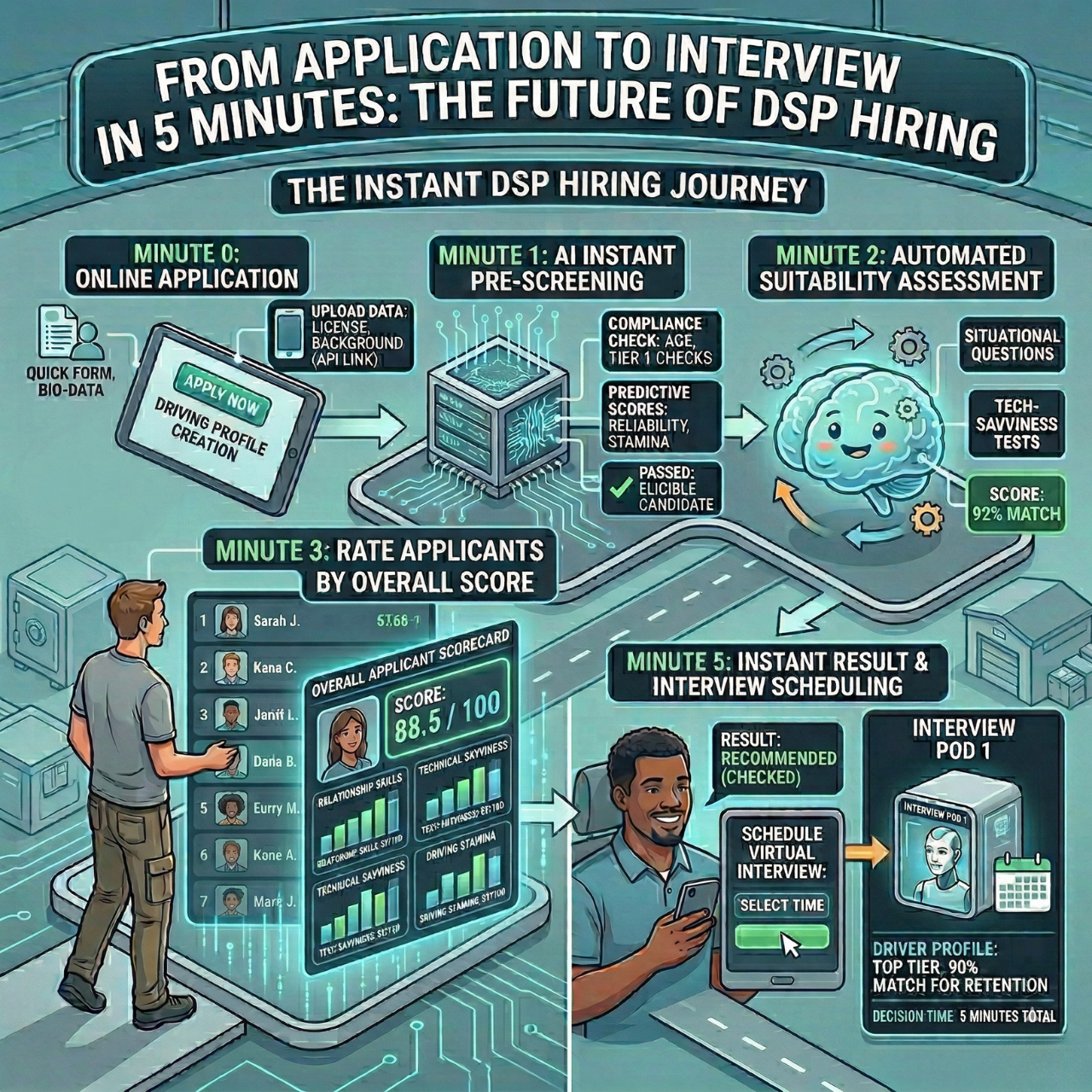
Staffing teams are stuck between urgent client demands and candidates who expect instant replies. Automation strategies for staffing agencies help you escape slow manual screening, constant rescheduling, and disorganized communication that leads to dropouts and missed placements.
HRMLESS lets you replace repetitive admin with AI-driven workflows that pre-screen candidates, schedule interviews, and send timely updates automatically. Your recruiters spend less time chasing paperwork and more time building real relationships with clients and candidates.
In this article, you’ll see where automation creates the biggest wins in your process, how to pick the right tools, and which metrics to watch. The aim is simple: a faster, fairer, and more predictable hiring engine for your agency.
What Is Staffing Automation?
Staffing automation uses software to handle hiring tasks like screening resumes, scheduling interviews, and scoring candidates. Instead of slogging through these steps by hand, automation tools take over the repetitive work.
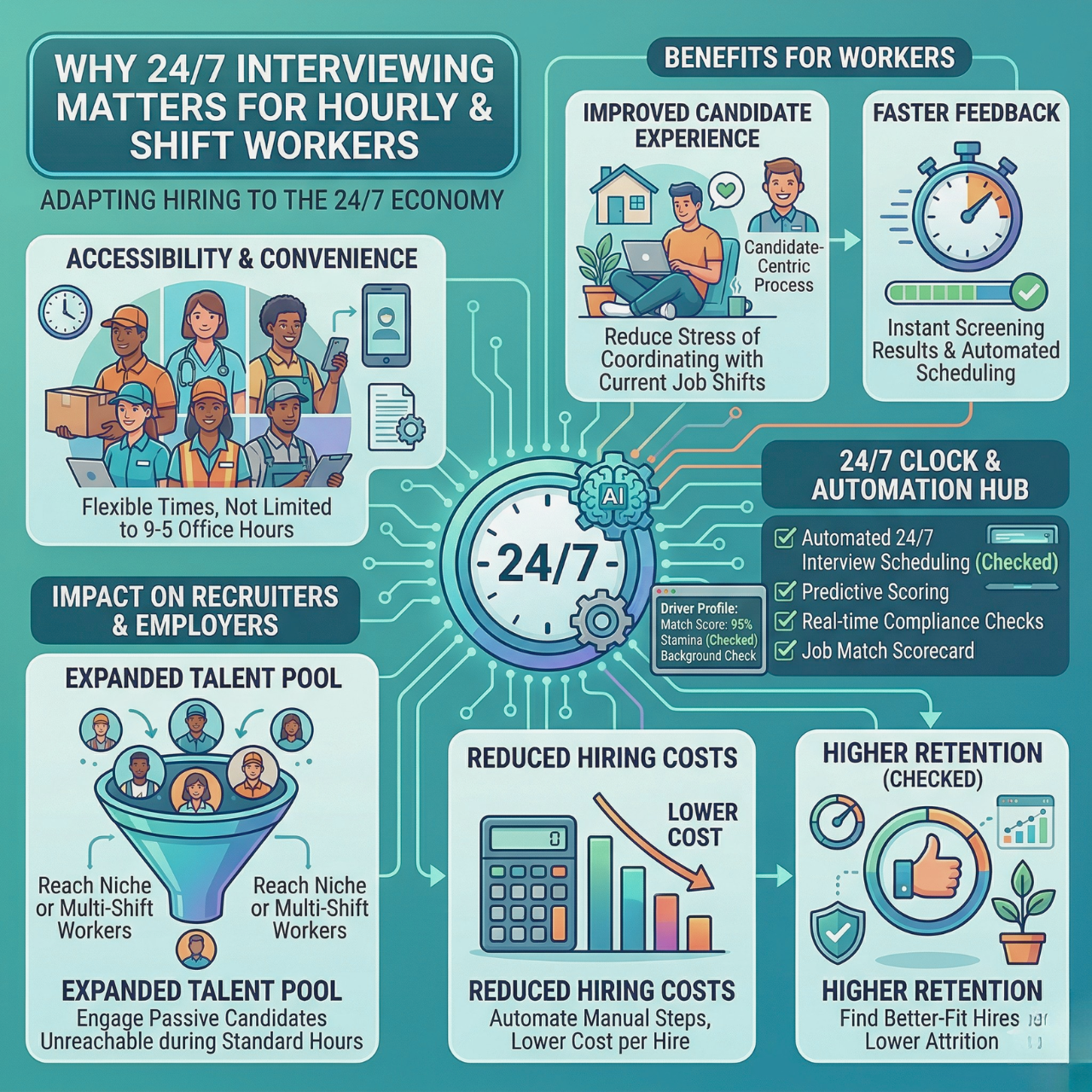
This means you spend less time on paperwork and more on talking with the right people. Automation often works alongside your ATS (Applicant Tracking System) to keep everything in one place, from applications to interview notes. Some platforms use AI to run interviews 24/7 and rank candidates instantly, so you never miss top talent.
Key Benefits for Staffing Firms
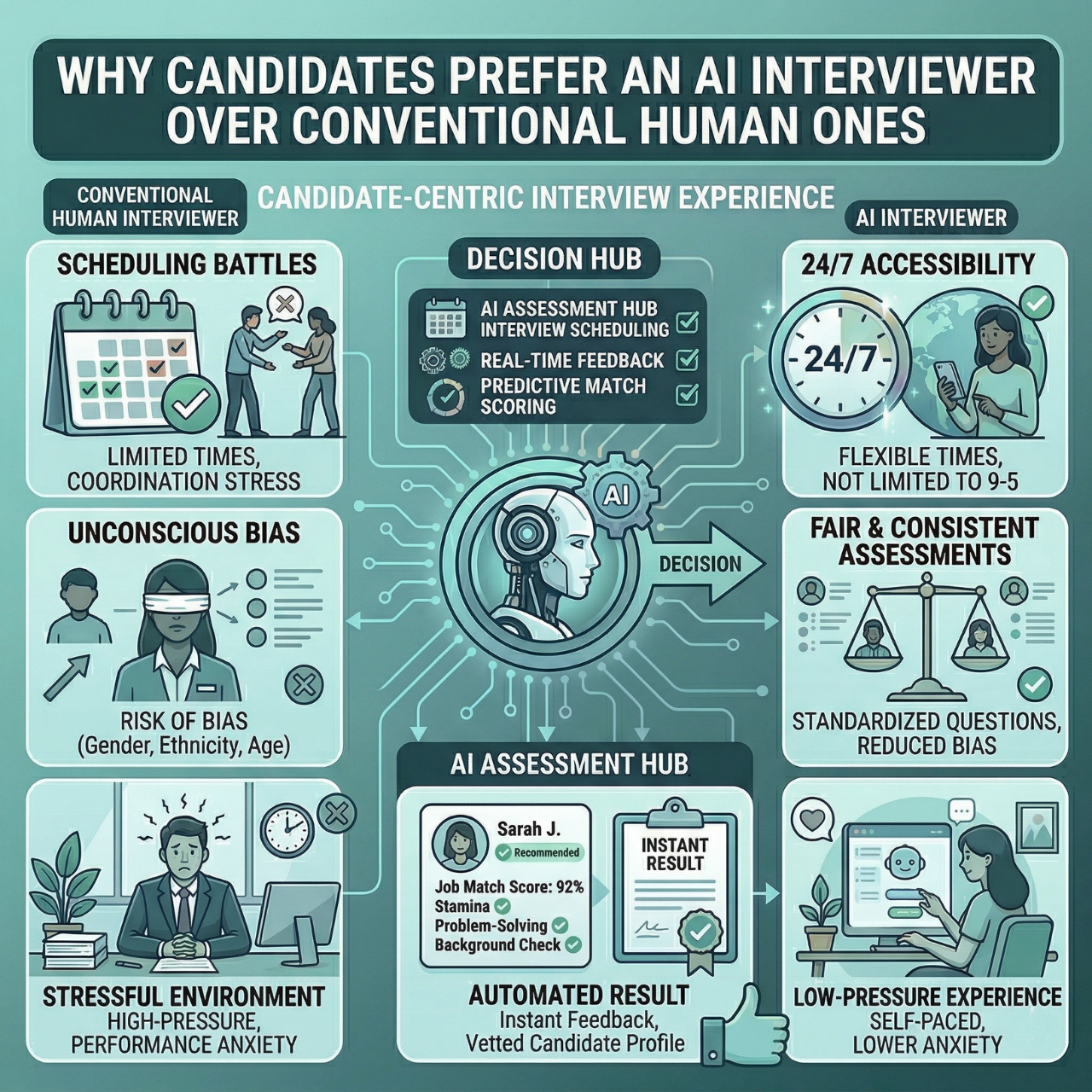
Automation speeds up hiring by cutting down on repetitive work. You fill jobs faster because candidates move through steps like screening and scheduling without delay.
Automated tools treat every candidate consistently, lowering human error and bias. This helps your firm stay fair and build a more diverse talent pool. You also save time, often a couple of hours per hire, and reduce no-shows by engaging candidates through SMS and email reminders.
On top of that, automation tools scale with your needs, letting you handle more roles without burning out your team.
Common Challenges to Automation
Even with clear benefits, automation can get tricky. Finding the right tools that fit your workflow without causing chaos is a real hurdle.
Your team might need time to get used to new software, and automated messages can sound robotic if you’re not careful, which hurts engagement. Data privacy and compliance always matter when using AI in hiring, so you’ll want to ensure all automation respects laws and candidate privacy.
Choosing a platform with smooth ATS integration helps you avoid tech headaches and keeps your automation strategies for staffing agencies sustainable over time.
Identifying Opportunities for Automation
Finding where automation fits best starts with knowing your current hiring tasks and spotting which ones eat up the most time or cause delays. You also want to focus on processes that bring the biggest value when automated, not just what feels flashy. Measuring how automation will pay off helps you make smarter decisions that improve your workflow.
Analyzing Current Workflows
Take a close look at all the steps in your hiring process. Map out tasks like resume screening, candidate scoring, interview scheduling, and communication.
Then, note which parts take the most time or require repetitive work. Ask yourself:
- Where do delays or backups happen?
- Which tasks need a lot of manual input?
- Are there repetitive steps that don’t add value?
This analysis uncovers areas where automation, like AI pre-screening or automated scheduling, can take over the busy work and free up your recruiters.
Prioritizing Automated Processes
Not every step needs automation right away. Instead, focus on the tasks that slow your team down and repeat often.
For example, screening resumes and scheduling interviews usually eat up a lot of time and are great candidates for automation. You can prioritize based on:
- Time saved with automation
- Impact on candidate experience
- Reduction of no-shows and ghosting
By starting with these areas, you begin building automation strategies for staffing agencies that actually support recruiters, so they can focus on relationships, not admin tasks.
Assessing ROI for Automation Initiatives
Before you invest, check how much time and money automation will save. Calculate the hours spent on each task and compare that to the cost of the tool or software.
Keep this checklist handy:
- Hours saved per hire
- Reduction in time to fill roles
- Improvement in candidate quality and engagement
- Lower rates of no-shows or dropouts
Keep tracking results after you implement new tools. Real-time dashboards help you measure key metrics and adjust your strategy as you go, so automation keeps delivering value instead of becoming a sunk cost.
Selecting the Right Automation Tools
Choosing automation tools means focusing on speed, easy integration, and features that help you hire better candidates while saving time. The right system works well with your current processes, keeps candidates engaged, and automates tasks like screening and scheduling without disrupting your team.
Applicant Tracking Systems
An Applicant Tracking System (ATS) is the backbone of hiring automation. It stores applications, tracks candidates, and helps you manage each step of hiring from one place.
Look for an ATS that:
- Integrates easily with your current HR software
- Offers automation for screening and scoring candidates
- Supports real-time analytics to spot bottlenecks
- Reduces no-shows through automated scheduling
The best ATS will help you organize candidates efficiently and let your team focus on talking to the right people instead of updating spreadsheets.
Customer Relationship Management Integration
Automation tools should fit smoothly with your Customer Relationship Management (CRM) system. This connection helps keep all candidate communication clear and timely across email, SMS, and other channels.
Good CRM integration can:
- Keep candidates informed and engaged with automated messages
- Reduce ghosting by sending instant reminders
- Track every interaction in one place
- Help you build a better talent pipeline over time
By syncing your automation platform with your CRM, you avoid scattered communication and create a better hiring experience for candidates and clients.
Automation Software Features
Not all automation software is created equal. Focus on features that directly improve your hiring process and save you hours.
Important features include:
Feature
Benefit
AI Pre-Screening
Lets candidates interview anytime, reducing delays.
Automated Scoring
Highlights top applicants quickly and fairly.
Scheduling
Cuts no-shows by only inviting engaged candidates.
SMS & Email Nudges
Keeps candidates moving through the process.
ATS & CRM Integration
Connects all your tools for seamless workflows.
Some platforms combine these features to automate repetitive tasks and keep your hiring moving. With tools like these, you spend less time on manual work and see better candidate outcomes from end to end.
Streamlining Candidate Sourcing and Screening
Efficient sourcing and screening save you time and help you focus on the best talent. Automation tools let you handle resumes, match candidates to jobs, and assess skills faster and more fairly, without losing visibility into the process.
Automated Resume Parsing
Resume parsing uses AI to quickly pull key information from resumes. Instead of reading each one, your system extracts details like skills, experience, and education automatically.
This speeds up the early review phase and makes sure no important info slips through the cracks. You get a clean, organized list of candidates ready for the next steps. Parsing also fits with your ATS to keep all candidate info in one place, so you end up saving hours and can focus on talking to top candidates, not sorting papers.
AI-Driven Candidate Matching
AI matching compares candidate profiles with job requirements instantly. It scores and ranks applicants based on skills, experience, and education.
This lets you see who fits the role best without digging through piles manually. AI keeps your process more consistent by using data rather than gut feelings. You can also customize filters to match your job’s needs precisely, which speeds up hiring and helps reduce no-shows since only the right candidates move forward.
Pre-Employment Assessments
Pre-employment assessments check candidates’ skills and fit before interviews. Automated tests look at abilities like typing speed, coding, or communication skills.
These assessments save time by screening out unqualified applicants early and give you clear data on each candidate’s strengths and weaknesses. Using automated assessments can also lower bias by providing more objective results. Some tools let candidates complete these tests at their convenience, anytime.
By combining assessments with AI tools, you hire faster and with more confidence.
Optimizing Communication and Engagement
Effective communication keeps your hiring process smooth and candidates interested. Using automation to reach out, personalize messages, and manage follow-ups saves time while improving candidate experience and engagement.
Automated Candidate Outreach
Automated outreach lets you contact candidates quickly without typing out every message yourself. You can set up emails and SMS messages to go out instantly after key events, like application submission or interview scheduling.
This helps maintain momentum by giving timely updates and reminders. Automated nudges reduce candidate dropouts and keep your hiring pipeline moving. Some tools even let you send surveys after each step to gather feedback, so you can spot where candidates get confused or lose interest. Plus, automated outreach works around the clock, so no candidate is left waiting for a response.
Personalized Messaging at Scale
Sending generic messages lowers candidate engagement. Personalized messaging at scale means tailoring your communication without adding extra work to your team.
Automation platforms can insert names, roles, and other details dynamically. You can segment candidates by skill, location, or stage to send the right message to the right group. This type of messaging builds trust and shows candidates they matter while helping your company come across as professional and attentive.
Using AI to craft personalized emails or texts lets you stay human while handling large volumes, which helps you avoid repetitive or robotic communication.
Follow-Up and Interview Scheduling
Following up quickly keeps candidates engaged and helps cut down on no-shows. Automated reminders by SMS or email nudge candidates so they don’t forget interviews or important next steps.
AI-powered scheduling tools let candidates pick times that work for them, so you skip the usual back-and-forth emails. Automated interview booking saves hours per hire and slashes scheduling mistakes. Timely follow-ups and smooth scheduling feel more professional for candidates and make your own workflow far less chaotic.
Automating Onboarding and Compliance
Automation speeds up onboarding and helps you avoid simple but costly mistakes. It makes document management, background checks, and legal compliance less of a headache, freeing up your time and keeping things fair for everyone.
Digital Documentation Management
You can automate collecting, storing, and tracking new hire documents such as tax forms, IDs, and contracts. Digital systems let candidates upload files whenever it suits them, so you’re not stuck waiting for missing forms.
Automation tools send reminders for incomplete documents and keep everything tidy in one place. You get instant access to files and can share them with payroll or HR teams without digging through email chains. That means less grunt work and a faster onboarding process for each placement.
Background Checks and Verification
Background checks are important, but they can eat up a lot of time. Automation starts these checks right after hiring decisions, so you don’t have to babysit the process.
Systems connect with trusted vendors to verify education, job history, and criminal records while you focus elsewhere. Results show up faster, and you get notified if any issues pop up. As a result, you spend less time wrangling vendors and more time on candidates who actually matter.
Compliance Workflow Automation
Labor laws and company policies are not optional, but tracking them all can be overwhelming. Automated workflows walk candidates through compliance steps like signing forms or completing training.
You can tweak workflows to match tricky rules and deadlines, and the system tracks who has completed what. Follow-up reminders go out automatically, so you’re not chasing people down. This cuts risk, keeps you audit-ready, and helps your agency stay safe without extra busywork.
Enhancing Analytics and Reporting
Good analytics give you real-time insights to improve your hiring process instead of relying on guesswork. You can see where candidates drop off and get a feel for what you’ll need next month or next quarter. Using data this way saves time and makes your recruiting strategy sharper.
Real-Time Data Dashboards
With real-time dashboards, you see your hiring pipeline at a glance. These dashboards track key stats like time to hire, candidate engagement, and bottlenecks.
If there’s a delay, you spot it quickly and can actually do something about it. Automated alerts let you know when candidates drop out or get stuck, and multi-channel nudges via SMS and email keep people responsive. Your team can focus on what matters because data tracking runs in the background.
Less manual entry means more time making decisions based on actual numbers, and it becomes easier to measure hiring ROI and keep improving.
Predictive Analytics for Workforce Planning
Predictive analytics uses past data and AI to estimate which candidates will succeed and what your hiring needs will be. By looking at trends in candidate quality and job performance, you can zero in on profiles that really deliver.
Predictive models also show how long it will take to fill certain roles, so you can plan better. With these insights, you build a pipeline that matches your growth, not just a pile of resumes. It even helps cut down on candidate ghosting by flagging when people might lose interest.
Automated scoring and ranking mean your team spends time only on top talent, saving everyone a lot of hassle.
Evaluating and Improving Automation Strategies
To keep hiring running smoothly, you have to check how your automation is actually working. Track the data, listen to feedback, and measure what matters; otherwise, you are just guessing.
Performance Monitoring
Keep an eye on your automation tools every day. Look at how many candidates make it through each step, how long screening takes, and whether scheduling is running as it should.
You can set up alerts for when things get stuck or take too long. Performance dashboards help you catch issues early so you are not constantly putting out fires later.
Feedback Loops and Continuous Improvement
Ask your team and candidates what is working and what is not. Sometimes the system slows things down or misses great candidates, and you will not know unless you ask.
Candidates might feel communication is too robotic or impersonal, so you should adjust your messaging if that is the case. Check in on feedback regularly and tweak your tools or workflows as needed. Continuous improvement keeps automation useful and user-friendly, not just another layer of tech to manage.
Measuring Success Metrics
Pick the right metrics so you know if automation is actually helping:
- Time to hire
- Candidate dropout rate
- Quality of candidates who make it to interviews
- Reduction in manual work hours
Compare your numbers before and after automation. For example, you might see time to hire drop by more than half, and no-shows cut dramatically. Use this data to make your case for automation and figure out what to try next.
Focus on the results that matter most to your agency, so you hit your targets and make life easier for everyone.
Future Trends in Staffing Agency Automation
Automation is no longer just about simple tasks; it is about connecting smarter tools that make hiring faster and fairer. Tech will keep shifting, helping you engage candidates better while cutting down on manual work and bias. This is bound to reshape how you handle the whole hiring workflow.
Emerging AI Applications
AI is getting better at understanding candidates, with natural language processing playing a big role. You can use automated pre-screening to score applicants and spot top talent quickly.
AI tools do more than sort resumes; they actually talk to candidates through email and SMS to keep them engaged. You will save hours with features like automated interview scheduling and real-time analytics that track your progress. Some platforms even offer 24/7 AI interviews so candidates can do assessments whenever it suits them. That means you get qualified candidates faster, with less effort from your team.
Impact of Automation on Client Relationships
Automation helps you look professional and stay responsive with clients. You can update them on candidate status without awkward delays, which cuts errors and builds trust.
With less admin work, you get to personalize your service instead of drowning in paperwork. It becomes easier to take on more clients and roles while keeping quality high. Integrating tools with your current systems keeps things running smoothly and helps you scale without the usual headaches.
A Faster, More Predictable Hiring Engine
Automation cuts the repetitive work that slows staffing teams down, giving you faster screening, smoother scheduling, and more consistent candidate engagement. When admin shrinks, your team can focus on higher-value conversations and deliver quicker, more reliable placements.
With HRMLESS, automation becomes a practical way to reduce delays, minimize dropouts, and keep every step of hiring organized. The tools handle the busywork so your recruiters can operate with clarity instead of chaos.
If you are ready to make your hiring process faster and far less stressful, book a demo and see how automation transforms your workflow.
Frequently Asked Questions
How can we streamline candidate sourcing with automation?
AI tools can scan resumes and profiles in seconds. Automation picks out the best matches based on skills and experience, so you are not buried in applications. You end up spending less time sorting and more time talking to great candidates.
What tools help in automating the interview scheduling process?
Automated scheduling systems let candidates pick interview times that fit their schedules. These tools send confirmations and reminders, which really help cut down on no-shows. It is a huge time saver, with no more endless email threads just to set up one meeting.
What is the best way to automate employee onboarding for a staffing agency?
Set up automated workflows that send documents and training materials to new hires before they start. Use checklists to track progress and make sure nothing falls through the cracks. Automation also answers common questions quickly, making onboarding less stressful for everyone.
How can automation improve client relationship management in staffing?
Automation keeps client communications regular and on time, with emails, updates, and reports all handled automatically. It tracks client needs and helps you respond faster, so clients always feel informed. That builds trust and saves you from drowning in manual updates.
What are the benefits of using automated screening for applicants?
Automated screening weeds out unqualified candidates early. It scores applicants using your criteria, so you only spend time on the best fits. This approach speeds up the hiring steps and helps reduce bias in decision-making, at least in theory.
Which automated reporting features can help staffing agencies track performance?
Real-time dashboards show key data like time to hire, candidate engagement, and bottlenecks, while automated reports highlight trends and flag areas that need attention. With these insights, you can spot issues and tweak your hiring process as you go.
It is not just about raw numbers; sometimes, a dashboard will surprise you with what is working and what is not. Some platforms offer these features out of the box, helping you hire faster and smarter. AI-powered tools can really cut through the chaos and make automation feel much less intimidating.
Featured

Subscribe to ournewsletter
Related posts
Explore the world of photography with our curated selection of
portfolio websites that showcase creativity and innovation.